Reviewing Microsoft’s Mixed Reality Headset the Dell Visor
A detailed review of Microsoft's Dell Visor mixed reality headset, highlighting user experience and practical applications.
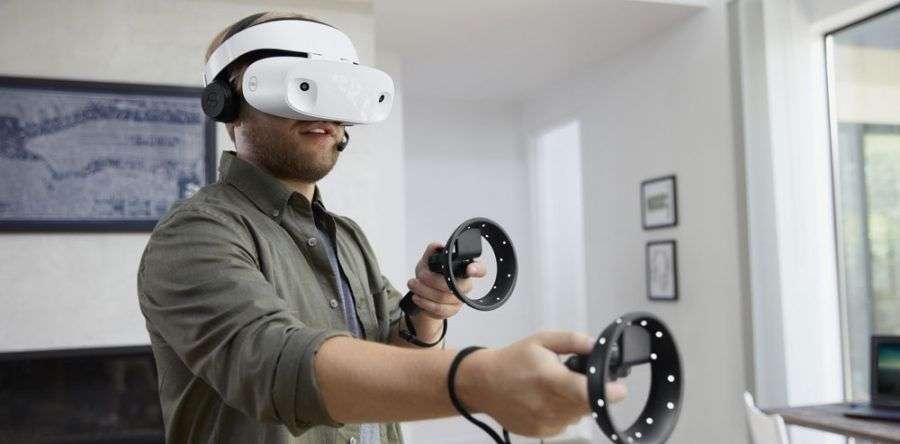
We are always excited to get new tech in the Devika office and this week we have been lucky enough to receive the new Dell Visor.
With Microsoft standardizing their mixed reality technology, companies have worked to add a series of new products to the marketplace with entries from Acer, Dell, HP, Lenovo, and Samsung.
Within the last month, Microsoft’s Mixed Reality Headsets have been released, which have virtual reality capabilities. The capabilities of the Mixed Reality Headsets are similar to the Oculus Rift and HTC Vive. The main difference is that Microsoft’s headsets do not require external sensors.
Dell Visor Degrees of Freedom
These headsets offer positional tracking to allow six degrees of freedom (6DoF) without traditional sensors having to be placed throughout the room. This is possible because of the two cameras on the front of the headset that track the position of the headset and the motion controllers. However, the lack of external sensors means that the headset doesn’t do a great job of picking up movements when you place your hands close to your headset or behind your back.
Resolution
The headset offers a resolution of 1440×1440 per eye with a 706 PPI which is presented through its 2.89 inch LCD panel. This includes a refresh rate of 90 Hz, through a fresnel-type lens. The field of view for the visor is 110 degrees, which features 6DoF inside out tracking.
Comfort
The Dell visors name comes from is its flip-up hinge which creates its visor effect. From our experience, the headset is comfortable, however, the hinges can be rigid when moving the visor.
Much like other VR headset on the market, it utilizes two handheld controllers which allow the participants to engage with active experiences. The controllers are standardized across all Microsoft headset which can feel a bit awkward on first use. The controllers also are not rechargeable but instead require AA batteries which can make consistent use more difficult.
Setup
In regards to setup, this is a fairly convenient model with an easy setup that only requires one cable (USB + HDMI). This means that transport is easy, which is helpful if you need to move your headset to multiple locations. However, the cord is a bit short which restricts movements.
From our experience, the visual quality looks good when using it for VR experiences. This is due to the previously mentioned refresh rate of 90 Hz and is 2.89 inch LCD panel. A downside of this experience, however, is that peripheral vision can be blurry. Overall, the experience is comparable to the HTC Vive or Oculus Rift.
For a first addition to the marketplace of VR headsets, its design and comfort stand out. Things we would like to see improved are the peripheral vision and some structural features like a longer cord and smoother hinge. Overall it’s a strong entry with comparable quality to its competitors and deserves consideration.
Contact our team here to start building your own mixed reality experience.